The new Fee Schedule will be released mid-July 2026 at sc.edu/bursar.
USC does not mail paper bills or statements. Account information is available on Self-Service Carolina. To view your statement, log into Self-Service Carolina, click on Account Information and then click Payment Gateway. The student receives an email when statements are available. The bill for Fall 2026 semester will be available starting in mid-July 2026 in SSC.
The deadline for Fall 2026 fee payment is August 12, 2026. Class schedules may be cancelled for all students who have not paid their fees in full.
If your bill is not correct you will need to contact the office that originated the charge. Contact the Office of Student Financial Aid and Scholarships for award information, the Office of South Carolina Residency for residency issues, Housing for room charges, Parking Services for parking charges and the Carolina Card Office (for Carolina Cash and meal plans.
All students who claimed South Carolina residency on their admissions application must submit the South Carolina Residency Certification Form on SSC to qualify for in-state tuition. Students who do not submit the residency certification will not be considered for in-state tuition. For additional questions please contact the Office of South Carolina Residency at (803) 777-5555 or at resident@mailbox.sc.edu.
You can pay your bill through SSC online at my.sc.edu . You will be able to use financial aid. E-check, MasterCard, Visa, Discover, or American Express to safely and securely provide payment. A 2.5% convenience fee is applied for each credit or debit card transaction and there is no fee when paying by e-check.
Students also have the option of setting up authorized users on their accounts. Authorized users can view and pay charges on a student’s account. Please see instructions for setting up an authorized user at www.sc.edu/sschelp.
Payments can be made in-person with cash, check, or money order or by mail at the address below. The mail-in deadline is August 4th. Please make your check or money order payable to the University of South Carolina (USC) and mail to:
University of South Carolina
Bursar’s Office
1244 Blossom Street- Suite 128
Columbia, SC 29208-0001
Payment plans are available if you cannot pay your balance in full. Plans cover tuition, housing, meal plans, Carolina Cash (during the optional fee period), mailbox, technology, and academic fees. Your monthly payment can be paid in person, mailed in to the Bursar’s Office, or paid online on SSC at my.sc.edu.
Payment plan options are available here under How to Pay, Ways to Pay and Payment Plan.
The University of South Carolina is proud to partner with GradGuard to offer students tuition protection. GradGuard’s Tuition Protection Plan helps students and their families overcome the financial losses that may result from events which force students to withdraw from the term due to a covered medical reason.
- It can reimburse tuition, room, board, and more after a withdrawal due to a covered reason
- It can provide protection for injury, illness, COVID and mental health
- It can help you avoid financial losses in the event of a covered
- It can increase the possibility that you return to school in the event of the
- It provides you access to an assistance hotline to help students and their families take care of emergencies and unexpected issues.
Tuition insurance must be purchased before the end of the drop/add period of the full term and is offered as a voluntary benefit to our families, your participation is not required but highly recommended. The school is not compensated for this program.
Learn more by calling GradGuard at 877-794-6603 or visit their website at GradGuard and search for the University of South Carolina and your campus.
Please check with your Plan Administrator on how funds are issued, length of time to disburse funds, etc. Once bills are available on SSC, please send a copy of your bill to your Plan Administrator immediately. Please have your 529 Savings Plan or Scholarship check mailed to the Bursar’s Office by the payment deadline.
Information regarding Prepaid College Plans can be submitted to our office at bursform@mailbox.sc.edu
For university scholarships, please contact the Office of Student Financial Aid and Scholarships at USC Columbia for information about your scholarships, grants, and loans. Information is also available under the Financial Aid tab of Self-Service Carolina. If you are receiving a scholarship from an organization outside of the university and do not see it receipted on your account via Self-Service Carolina, please contact that organization to determine what date the payment was mailed. If you still have questions, please contact our office at 803-777-4233.
Please contact the Office of Student Financial Aid and Scholarships at USCFAID@mailbox.sc.edu for assistance. If you are a Transfer Student who has not received your financial aid awards, please contact us to discuss payment options.
Private loans can only be posted to the student account once the funds have been received from the lender.
Please contact Veteran Services by phone (803-777-5156) or by email at veterans@sc.edu for information concerning your benefits on the USC Columbia campus.
If you have questions regarding ACM, please contact USC Academic Common Market Institutional Coordinator’s Office at ACMINFO@mailbox.sc.edu.
You can set up direct deposit on SSC. If you have not set up direct deposit, you will receive a paper check in 7-10 business days. The paper check will be made payable to the student and mailed to the address on file.
The new annual $300 ($150.00 per semester for full-time students and $12.50 per credit hour for part-time students) auxiliary athletics fee is designed to continue student access to athletics events/ticket lottery, address increased event/program operating costs, and enhance the student experience across multiple USC sporting venues. Enhancements will include student-centered in game activity and promotions, facility upgrades and additional support for health/safety staffing at athletics events.
The fee is mandatory for full-time and part-time undergraduate, graduate, and professional students.
The athletics fee will not be used for recently approved Williams-Brice stadium renovations, Name Image and Likeness or coaching contracts.
2026-2027 Academic Fee Schedule
| Academic fee (per semester) | Resident | Non-Resident |
|---|---|---|
| Undergraduate Tuition | ||
| Full-time (12-16 hours) | $6,144 | $19,050 |
| Part-time (less than 12 hours, rates are per hour) | $512 | $1,587.50 |
| Non-resident Scholarship -Departmental | $10,500 | |
| Non-resident Scholarship -Recognition | $16,194 | |
| Non-resident Scholarship - Divisional | $13,542 | |
| Active Duty Military – Verification Required | $3,000 | $3,000 |
| Non-resident Scholarship - McNair, Horseshoe Scholar, Academic Scholar (Elite, Excellence, Superlative), Provost Scholar, Alumni Scholars and Athletics | $6,144 | |
| Undergraduate - Resident, Nonresident Scholarship, Active Duty Military - 17 hours and above (Per credit hour over 16 hours) | $80 | |
| Undergraduate - Nonresident - 17 hours and above (Per credit hour over 16 hours) | $208 | |
| Matriculation fee | $80 | $80 |
| Technology fee | ||
| Full-time | $200 | $200 |
| Part-time (per hour) | $17 | $17 |
| Reinstatement Fee – Per occurrence – re-enrollment fee for students dropped for nonpayment | $75 | $75 |
| Auxiliary Athletics Fee – Full-time students | $150 | $150 |
| Fees are per semester and are subject to change without notice. |
A list of additional information, including academic, housing and meal plan fees can
be found here.
The deadline for Fall 2026 payment is August 12, 2026.
- Log onto my.sc.edu using your VIP ID and password.
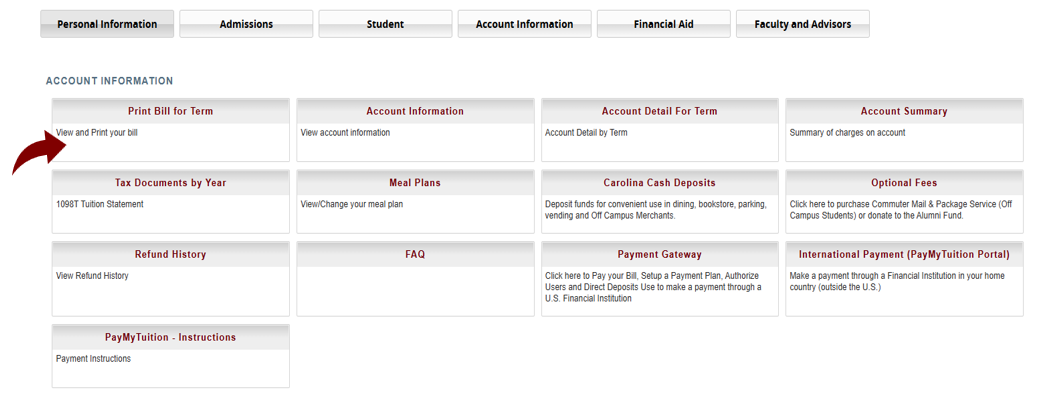
- Click Account Information.
- Click Print Bill for Term.
- Select term and click Submit.
- The details of the account activity will display. Click Email my Billing Statement to have the statement emailed.
- Once completed, the student will receive a message indicating the email statement was sent.
- Log into sc.edu.
- Click Account Information.
- Click Payment Gateway and you will be prompted to use your multifactor authentication device to access the next screen.
- Select Electronic Refunds.
- Click Enroll in Two Step Verification or Complete Two Step Verification to update a refund method.
- Follow Instructions to select a Primary Method (Text, Email or Google Authenticator) to receive your passcode. Once you choose the method, you will receive a passcode that will allow you to continue.
- Enter the passcode and click
- Click the Refunds
- Click Set-up Account. If you have previously set up an account, you will only have the option to edit or remove the existing account. Please use personal checking accounts Fill in all requested information.
- Create an identifying name for the account and key this in the Save Payment Method As Then click Continue.
- Read the agreement If you still want to set up a direct deposit account, click the I Agree box and click Continue to complete your transaction.
- You will receive a confirmation message if your account was successfully
Why be an Authorized User?
- Receive monthly emails about balance due
- View account balance and payment history
- View receipts and other useful information
- Access 1098-T tax information online; view and print 1098-T forms
- Set up a Payment Plan
- Save payment methods which can only be viewed by the Authorized User
What are the steps the student must follow to set you up?
- Log onto my.sc.edu using VIP ID & password
- Navigate: Account Information -> Payment Gateway -> Authorized User
- Enter email address for Authorized User (more than one can be added)
- Select YES/NO for what information the Authorized User should be allowed to view
- Continue -> read agreement -> agree -> print agreement -> continue to submit the transaction
- A message will appear to the student with notification that the Authorized User will receive an email. Authorized Users will have their own ID and password.
- Authorized users can be deleted and viewing permission can be edited by the Additional Authorized Users can be added by the student as well.
NOTE: Unless the parent/guardian/other is set up as an Authorized User, no student account information can be shared.